项目开发流程及技术选型 流程 需求分析 => 设计(概要设计、详细设计) => 技术选型 =>
需求分析与技术选型
登录 / 注册
用户管理(仅管理员可见)对用户的查询或者修改
用户校验
前端:三件套
前端初始化 Vue 初始化
创建项目Vue官网 npm create vue@latestnpm install 安装依赖
格式规范
使用组件库Ant Design Vue 版本:4.2.6$ npm i --save ant-design-vue@4.x
main.ts中引入文档的全局完整注册
1
2
3
4
5
6
7
8
import { createApp } from 'vue' ;import Antd from 'ant-design-vue' ;import App from './App' ;import 'ant-design-vue/dist/reset.css' ;const app = createApp (App );app.use (Antd ).mount ('#app' );
全局布局管理TS与组合式API
1
2
3
4
5
<a-layout> <a-layout-header :style ="headerStyle" > Header</a-layout-header > <a-layout-content :style ="contentStyle" > Content</a-layout-content > <a-layout-footer :style ="footerStyle" > Footer</a-layout-footer > </a-layout>
在App.vue中添加内容
1 2 3 4 5 6 7 8 9 <template > <div id ="app" > <BasicLayout /> </div > </template > <style scoped > </style > <script setup lang ="ts" > import BasicLayout from "@/layouts/BasicLayout.vue"; </script >
继续在BasicLayout.vue中编写代码
1 2 3 4 5 6 7 8 9 10 11 12 13 14 15 16 17 18 19 20 21 22 23 24 25 26 <template > <div id ="basicLayout" > <a-layout > <a-layout-header > Header</a-layout-header > <a-layout-content > Content</a-layout-content > <a-layout-footer class ="footer" > <a href ="https://wzcwzc10.github.io" target ="_blank" > 微光zc的网络小屋</a > </a-layout-footer > </a-layout > </div > </template > <script setup lang ="ts" > </script > <style scoped > #basicLayout .footer { background : #222222 ; text-align : center; position : fixed; bottom : 0 ; left : 0 ; right : 0 ; padding : 16px ; } </style >
创建路由路由
1 2 3 4 5 6 7 8 9 10 11 12 13 14 15 16 17 18 19 20 21 22 23 24 25 26 27 28 29 30 31 32 33 34 35 36 37 38 39 40 <template > <div id ="basicLayout" > <a-layout > <a-layout-header class ="header" > <GlobalHeader /> </a-layout-header > <a-layout-content class ="content" > <router-view /> </a-layout-content > <a-layout-footer class ="footer" > <a href ="https://wzcwzc10.github.io" target ="_blank" > 微光zc的网络小屋</a > </a-layout-footer > </a-layout > </div > </template > <script setup lang ="ts" > import GlobalHeader from "@/components/GlobalHeader.vue" ;</script > <style scoped > #basicLayout .footer { background : #222222 ; text-align : center; position : fixed; bottom : 0 ; left : 0 ; right : 0 ; padding : 16px ; } #basicLayout .content { padding : 20px ; margin-bottom : 20px ; background : linear-gradient (to right, #FCFCFCD8 , #ffffff ); } #basicLayout .header { background : #ffffff ; margin-bottom : 16px ; color : #ffffff ; padding-inline : 20px ; } </style >
在router的index.ts添加路由
1
2
3
4
5
6
7
8
9
10
11
12
13
14
15
16
17
18
19
20
{ path : "/" , name : "home" , component : HomePage , }, { path : "/user/login" , name : "userLogin" , component : UserLoginPage , }, { path : "/user/register" , name : "userRegister" , component : UserRegisterPage , }, { path : "/admin/userManage" , name : "adminUserManage" , component : UserManagePage , },
顶部栏
1 2 3 4 5 6 7 8 9 10 11 12 13 14 15 16 17 18 19 20 21 22 23 24 25 26 27 28 29 30 31 32 33 34 35 36 37 38 39 40 41 42 43 44 45 46 47 48 49 50 51 52 53 54 55 56 57 58 59 60 61 62 63 64 65 66 67 68 69 70 71 72 73 74 75 76 77 78 79 80 81 82 83 84 85 86 87 88 89 90 91 92 93 94 95 96 97 98 99 100 101 102 103 104 105 106 107 <template > <div id ="globalHeader" > <a-row :wrap ="false" > <a-col flex ="200px" > <div class ="title-bar" > <img class ="logo" src ="../../src/assets/logo.png" alt ="logo" /> <div class ="title" > 微光管理中心</div > </div > </a-col > <a-col flex ="auto" > <a-menu v-model:selectedKeys ="current" mode ="horizontal" :items ="items" @click ="doMenuClick" /> </a-col > <a-col flex ="80px" > <div class ="user-login-status" > </div > </a-col > </a-row > </div > </template > <script lang ="ts" setup > import { h, ref } from "vue" ;import { CrownOutlined , HomeOutlined } from "@ant-design/icons-vue" ;import { MenuProps } from "ant-design-vue" ;import { useRouter } from "vue-router" ;const router = useRouter ();const doMenuClick = ({ key }: { key: string } ) => { router.push ({ path : key, }); }; const current = ref<string[]>(["mail" ]);router.afterEach ((to, from , failure ) => { current.value = [to.path ]; }); const items = ref<MenuProps ["items" ]>([ { key : "/" , icon : () => h (HomeOutlined ), label : "主页" , title : "主页" , }, { key : "/user/login" , label : "用户登录" , title : "用户登录" , }, { key : "/user/register" , label : "用户注册" , title : "用户注册" , }, { key : "/admin/userManage" , icon : () => h (CrownOutlined ), label : "用户管理" , title : "用户管理" , }, { key : "others" , label : h ( "a" , { href : "https://wzcwzc10.github.io" , target : "_blank" }, "微光zc的网络小窝" ), title : "微光zc的网络小窝" , }, ]); </script > <style scoped > .title-bar { display : flex; align-items : center; } .title { color : black; font-size : 18px ; margin-left : 16px ; } .logo { height : 48px ; } </style >
Axiosnpm install axios
1
2
3
4
5
6
7
8
9
10
11
12
13
14
15
16
17
18
19
20
21
22
23
24
25
26
27
28
29
30
31
32
33
34
35
36
37
38
39
40
41
42
43
44
45
46
47
48
49
50
51
52
53
54
55
56
57
import axios from "axios" ;alert (process.env .NODE_ENV );const myAxios = axios.create ({ baseURL : process.env .NODE_ENV === "development" ? "http://localhost:8080" : "https://codefather.cn" , timeout : 10000 , withCredentials : true , }); myAxios.interceptors .request .use ( function (config ) { return config; }, function (error ) { return Promise .reject (error); } ); myAxios.interceptors .response .use ( function (response ) { console .log (response); const { data } = response; console .log (data); if (data.code === 40100 ) { if ( !response.request .responseURL .includes ("user/current" ) && !window .location .pathname .includes ("/user/login" ) ) { window .location .href = `/user/login?redirect=${window .location.href} ` ; } } return response; }, function (error ) { return Promise .reject (error); } ); export default myAxios;
前后端联动 遇到端口冲突:–port 3000
1 2 3 4 5 6 7 8 9 10 11 12 13 14 15 16 17 18 19 20 21 22 23 24 25 26 27 28 29 30 31 32 33 34 35 36 37 38 39 40 41 42 43 44 45 46 47 48 49 50 51 52 53 54 55 56 57 58 59 60 61 62 63 64 65 66 67 68 69 70 71 72 73 74 75 76 77 78 79 import myAxios from "@/request" ;export const userRegister = async (params : any return myAxios.request ({ url : "/api/user/register" , method : "POST" , data : params, }); }; export const userLogin = async (params : any return myAxios.request ({ url : "/api/user/login" , method : "POST" , data : params, }); }; export const userLogout = async (params : any return myAxios.request ({ url : "/api/user/logout" , method : "POST" , data : params, }); }; export const getCurrentUser = async ( return myAxios.request ({ url : "/api/user/current" , method : "GET" , }); }; export const searchUsers = async (username : any return myAxios.request ({ url : "/api/user/search" , method : "GET" , params : { username, }, }); }; export const deleteUser = async (id : string return myAxios.request ({ url : "/api/user/delete" , method : "POST" , data : id, headers : { "Content-Type" : "application/json" , }, }); };
全局状态管理 pinia
1
2
3
4
5
6
7
8
9
10
11
12
13
14
15
16
17
18
19
20
21
22
23
24
25
26
27
28
29
30
import { defineStore } from "pinia" ;import { ref } from "vue" ;import { getCurrentUser } from "@/api/user" ;export const useLoginUserStore = defineStore ("loginUser" , () => { const loginUser = ref<any >({ username : "未登录" , }); async function fetchLoginUser ( const res = await getCurrentUser (); if (res.data .code === 0 && res.data .data ) { loginUser.value = res.data .data ; } } function setLoginUser (newLoginUser : any loginUser.value = newLoginUser; } return { loginUser, fetchLoginUser, setLoginUser }; });
页面开发 页面
欢迎页src/pages/HomePages.vue
1
2
3
4
5
6
7
8
9
10
11
12
13
14
<template> <div id ="homePage" > <h1 > {{ msg }}</h1 > </div > </template> <script setup lang ="ts" > const msg = "欢迎~" ;</script > <style scoped > #homePage { } </style >
登录页面src/pages/user/UserLoginPages.vue
1
2
3
4
5
6
7
8
9
10
11
12
13
14
15
16
17
18
19
20
21
22
23
24
25
26
27
28
29
30
31
32
33
34
35
36
37
38
39
40
41
42
43
44
45
46
47
48
49
50
51
52
53
54
55
56
57
58
59
60
61
62
63
64
65
66
67
68
69
70
71
72
73
74
75
76
77
78
79
80
81
82
83
84
85
86
87
88
89
<template> <div id ="userLoginPage" > <h2 class ="title" > 用户登录</h2 > <a-form style ="max-width: 480px; margin: 0 auto" :model ="formState" name ="basic" label-align ="left" :label-col ="{ span: 4 }" :wrapper-col ="{ span: 20 }" autocomplete ="off" @finish ="handleSubmit" > <a-form-item label ="账号" name ="userAccount" :rules ="[{ required: true, message: '请输入账号' }]" > <a-input v-model:value ="formState.userAccount" placeholder ="请输入账号" /> </a-form-item > <a-form-item label ="密码" name ="userPassword" :rules ="[ { required: true, message: '请输入密码' }, { min: 8, message: '密码不能小于 8 位' }, ]" > <a-input-password v-model:value ="formState.userPassword" placeholder ="请输入密码" /> </a-form-item > <a-form-item :wrapper-col ="{ offset: 4, span: 20 }" > <a-button type ="primary" html-type ="submit" > 登录</a-button > </a-form-item > </a-form > </div > </template> <script lang ="ts" setup > import { reactive } from "vue" ;import { userLogin } from "@/api/user" ;import { userLoginUserStore } from "@/stores/userLoginUserStore" ;import { message } from "ant-design-vue" ;import { useRouter } from "vue-router" ;interface FormState { userAccount : string; userPassword : string; } const formState = reactive<FormState >({ userAccount : "" , userPassword : "" , }); const router = useRouter ();const loginUserStore = userLoginUserStore ();const handleSubmit = async (values: any ) => { const res = await userLogin (values); if (res.data .code === 0 && res.data .data ) { await loginUserStore.fetchLoginUser (); message.success ("登录成功" ); router.push ({ path : "/" , replace : true , }); } else { message.error ("登录失败" ); } }; </script > <style scoped > #userLoginPage .title { text-align : center; margin-bottom : 16px ; } </style >
注册页面src/pages/user/UserRegisterPages.vue
1
2
3
4
5
6
7
8
9
10
11
12
13
14
15
16
17
18
19
20
21
22
23
24
25
26
27
28
29
30
31
32
33
34
35
36
37
38
39
40
41
42
43
44
45
46
47
48
49
50
51
52
53
54
55
56
57
58
59
60
61
62
63
64
65
66
67
68
69
70
71
72
73
74
75
76
77
78
79
80
81
82
83
84
85
86
87
88
89
90
91
92
93
94
95
96
97
98
99
100
101
102
103
104
105
106
107
108
109
110
111
112
113
114
115
116
117
118
<template> <div id ="userRegisterPage" > <h2 class ="title" > 用户注册</h2 > <a-form style ="max-width: 480px; margin: 0 auto" :model ="formState" name ="basic" label-align ="left" :label-col ="{ span: 4 }" :wrapper-col ="{ span: 20 }" autocomplete ="off" @finish ="handleSubmit" > <a-form-item label ="账号" name ="userAccount" :rules ="[{ required: true, message: '请输入账号' }]" > <a-input v-model:value ="formState.userAccount" placeholder ="请输入账号" /> </a-form-item > <a-form-item label ="密码" name ="userPassword" :rules ="[ { required: true, message: '请输入密码' }, { min: 8, message: '密码不能小于 8 位' }, ]" > <a-input-password v-model:value ="formState.userPassword" placeholder ="请输入密码" /> </a-form-item > <a-form-item label ="确认密码" name ="checkPassword" :rules ="[ { required: true, message: '请输入确认密码' }, { min: 8, message: '确认密码不能小于 8 位' }, ]" > <a-input-password v-model:value ="formState.checkPassword" placeholder ="请输入确认密码" /> </a-form-item > <a-form-item label ="编号" name ="planetCode" :rules ="[{ required: true, message: '请输入编号' }]" > <a-input v-model:value ="formState.planetCode" placeholder ="请输入编号" /> </a-form-item > <a-form-item :wrapper-col ="{ offset: 4, span: 20 }" > <a-button type ="primary" html-type ="submit" > 注册</a-button > </a-form-item > </a-form > </div > </template> <script lang ="ts" setup > import { reactive } from "vue" ;import { userRegister } from "@/api/user" ;import { message } from "ant-design-vue" ;import { useRouter } from "vue-router" ;interface FormState { userAccount : string; userPassword : string; checkPassword : string; planetCode : string; } const formState = reactive<FormState >({ userAccount : "" , userPassword : "" , checkPassword : "" , planetCode : "" , }); const router = useRouter ();const handleSubmit = async (values: any ) => { if (formState.userPassword !== formState.checkPassword ) { message.error ("二次输入的密码不一致" ); return ; } const res = await userRegister (values); if (res.data .code === 0 && res.data .data ) { message.success ("注册成功" ); router.push ({ path : "/user/login" , replace : true , }); } else { message.error ("注册失败," + res.data .description ); } }; </script > <style scoped > #userRegisterPage .title { text-align : center; margin-bottom : 16px ; } </style >
管理页面src/pages/admin/UserManagePage.vue
1
2
3
4
5
6
7
8
9
10
11
12
13
14
15
16
17
18
19
20
21
22
23
24
25
26
27
28
29
30
31
32
33
34
35
36
37
38
39
40
41
42
43
44
45
46
47
48
49
50
51
52
53
54
55
56
57
58
59
60
61
62
63
64
65
66
67
68
69
70
71
72
73
74
75
76
77
78
79
80
81
82
83
84
85
86
87
88
89
90
91
92
93
94
95
96
97
98
99
100
101
102
103
104
105
106
107
108
109
<template> <div id ="userManagePage" > <a-input-search style ="max-width: 320px; margin-bottom: 20px" v-model:value ="searchValue" placeholder ="输入用户名搜索" enter-button ="搜索" size ="large" @search ="onSearch" /> <a-table :columns ="columns" :data-source ="data" > <template #bodyCell ="{ column, record }" > <template v-if ="column.dataIndex === 'avatarUrl'" > <a-image :src ="record.avatarUrl" :width ="120" /> </template > <template v-else-if ="column.dataIndex === 'userRole'" > <div v-if ="record.userRole === 1" > <a-tag color ="green" > 管理员</a-tag > </div > <div v-else > <a-tag color ="blue" > 普通用户</a-tag > </div > </template > <template v-else-if ="column.dataIndex === 'createTime'" > {{ dayjs(record.createTime).format("YYYY-MM-DD HH:mm:ss") }} </template > <template v-else-if ="column.key === 'action'" > <a-button danger @click ="doDelete(record.id)" > 删除</a-button > </template > </template > </a-table > </div > </template> <script lang ="ts" setup > import { deleteUser, searchUsers } from "@/api/user" ;import { ref } from "vue" ;import { message } from "ant-design-vue" ;import dayjs from "dayjs" ;const searchValue = ref ("" );const onSearch = ( fetchData (searchValue.value ); }; const doDelete = async (id: string ) => { if (!id) { return ; } const res = await deleteUser (id); if (res.data .code === 0 ) { message.success ("删除成功" ); } else { message.error ("删除失败" ); } }; const columns = [ { title : "id" , dataIndex : "id" , }, { title : "用户名" , dataIndex : "username" , }, { title : "账号" , dataIndex : "userAccount" , }, { title : "头像" , dataIndex : "avatarUrl" , }, { title : "性别" , dataIndex : "gender" , }, { title : "创建时间" , dataIndex : "createTime" , }, { title : "用户角色" , dataIndex : "userRole" , }, { title : "操作" , key : "action" , }, ]; const data = ref ([]);const fetchData = async (username = "" ) => { const res = await searchUsers (username); if (res.data .data ) { data.value = res.data .data ; } else { message.error ("获取数据失败" ); } }; fetchData ();</script >
全局校验 创建src/access.ts
1
2
3
4
5
6
7
8
9
10
11
12
13
14
15
16
17
18
19
20
21
import router from "@/router" ;import { useLoginUserStore } from "@/store/userLoginUserStore" ;import { message } from "ant-design-vue" ;router.beforeEach (async (to, from , next) => { const loginUserStore = useLoginUserStore (); const loginUser = loginUserStore.loginUser ; const toUrl = to.fullPath ; if (toUrl.startsWith ("/admin" )) { if (!loginUser || loginUser.userRole !== 1 ) { message.error ("没有权限" ); next (`/user/login?redirect=${to.fullPath} ` ); return ; } } next (); });
在src/main.ts 中引入import './access.ts';
多环境 报出了 Cannot find name ‘process’ 的错误。npm install --save-dev @types/node
1
2
3
4
5
6
7
8
9
{ "compilerOptions" : { "types" : [ "vue" , "node" ] } }
1
2
3
4
5
6
7
8
9
10
11
alert (process.env .NODE_ENV );const myAxios = axios.create ({ baseURL : process.env .NODE_ENV === "development" ? "http://localhost:8080" : "https://codefather.cn" , timeout : 10000 , withCredentials : true , });
后端初始化
spring boot项目初始化
MyBatis相关介绍
数据库初始化官方教程 操作
1 2 3 4 5 <dependency > <groupId > com.baomidou</groupId > <artifactId > mybatis-plus-boot-starter</artifactId > <version > 3.5.14</version > </dependency >
JUnit 单元测试框架,在 Java 上编写和运行可重复的自动化测试。
1 2 3 4 5 6 7 <dependency > <groupId > junit</groupId > <artifactId > junit</artifactId > <version > 4.13.2</version > <scope > test</scope > </dependency >
配置文件
1
2
3
4
5
6
7
8
9
10
11
12
13
14
15
16
17
18
19
spring: application: name: user-center datasource: driver-class-name: com.mysql.cj.jdbc.Driver url: jdbc:mysql://localhost:3306/wzc username: root password: 123456 server: port: 8080 mybatis-plus: configuration: map-underscore-to-camel-case: false
创建数据库表
1
2
3
4
5
6
7
8
9
10
11
12
13
14
15
16
17
18
19
DROP TABLE IF EXISTS 'user' ;CREATE TABLE 'user' ( `username` varchar (256 ) NULL COMMENT '用户昵称' , `id` bigint NOT NULL AUTO_INCREMENT COMMENT 'id' , `userAccount` varchar (256 ) NULL COMMENT '账号' , `avatarUrl` varchar (1024 ) NULL COMMENT '用户头像' , `gender` tinyint NULL COMMENT '性别' , `userPassword` varchar (512 ) NOT NULL COMMENT '密码' , `phone` varchar (128 ) NULL COMMENT '电话' , `email` varchar (512 ) NULL COMMENT '邮箱' , `userStatus` int DEFAULT '0' NULL COMMENT '状态 0-正常' , `createTime` datetime DEFAULT CURRENT_TIMESTAMP NULL COMMENT '创建时间' , `updateTime` datetime DEFAULT CURRENT_TIMESTAMP NULL ON UPDATE CURRENT_TIMESTAMP COMMENT '更新时间' , `isDelete` tinyint DEFAULT '0' NOT NULL COMMENT '是否删除' , `userRole` tinyint DEFAULT '0' NULL COMMENT '用户角色 0-普通用户 1-管理员' , PRIMARY KEY (`id`) ) COMMENT= '用户表' ;
测试 Mybatis-plus 是否引入成功@MapperScan("fun.wgzc.usercenterbackend2026.mapper")
编写实体类 model/User.java:
1
2
3
4
5
6
7
@Data public class User { private Long id; private String name; private Integer age; private String email; }
编写BaseMapper<User>接口类 mapper/UserMapper.java:
1
2
3
public interface UserMapper extends BaseMapper <User> {}
添加测试类,进行功能测试(两种方式)
1
2
3
4
5
6
7
8
9
10
11
12
13
14
@SpringBootTest class UserCenterApplicationTests {@Resource private UserMapper userMapper;@Test void contextLoads () { System.out.println(("----- selectAll method test ------" )); List userList = userMapper.selectList(null ); Assert.isTrue(5 == userList.size(), "" ); userList.forEach(System.out::println); } }
1
2
3
4
5
6
7
8
9
10
11
12
13
14
@SpringBootTest public class SampleTest {@Resource private UserMapper userMapper;@Test public void testSelect () { System.out.println(("----- selectAll method test ------" )); List userList = userMapper.selectList(null ); Assert.isTrue(5 == userList.size(), "" ); userList.forEach(System.out::println); } }
Spring Boot 五层结构
文件
说明
补充说明
controller
请求层/控制层
应用程序的入口点,负责接收用户的请求并返回响应。
service
业务逻辑层
程序核心,负责处理业务逻辑。
mapper / dao
数据库访问层
负责与数据库交互,执行数据的增删改查(CRUD)操作。
model / entity / pojo
实体层
定义数据模型,即数据库表的映射实体类。
utils
存放一些工具类
static
静态文件(html)
后端注册登录功能 代码自动生成器 Mybatis-X 插件(根据数据库生成) •domain(实体对象)
右键数据库表,点击第一行路径默认
选择 camel 格式类名
测试
1
2
3
4
5
6
7
8
9
10
11
12
13
14
15
16
17
18
19
20
@SpringBootTest class UserServiceTest {@Resource private UserService userService;@Test void testAddUser () { User user = new User (); user.setUsername("wgzc" ); user.setUserAccount("123" ); user.setAvatarUrl("https://wzcwzc10.github.io/img/jufufu-ht.gif" ); user.setGender(0 ); user.setUserPassword("xxx" ); user.setPhone("123" ); user.setEmail("456" ); boolean result = userService.save(user); System.out.println(user.getId()); Assertions.assertTrue(result); }
详细设计 注册接口
前端输入账户和密码、以及校验码(todo)
校验用户的账户、密码、校验密码是否符合要求
对密码进行加密(千万不能明文存储到数据库中)
向数据库插入用户数据
登录接口
接收参数:用户账户、密码
请求类型:POST
请求体:JSON格式的数据
返回值:用户信息(脱敏)
逻辑
校验用户账户和密码是否合法
校验密码是否输入正确,要和数据库中的密文密码对比
用户脱敏,隐藏敏感信息,防止数据库中的字段泄露
我们要记录用户的登录态(session),将其存到服务器上(用后端SpringBoot框架封装的服务器tomcat去记录)
返回安全的脱敏后的用户信息
注册功能 去maven仓库引入 commons-lang3 依赖(类似hutool)
1 2 3 4 5 6 <dependency > <groupId > org.apache.commons</groupId > <artifactId > commons-lang3</artifactId > <version > 3.18.0</version > </dependency >
在 UserService 类中添加long userRegister(String userAccount, String userPassword, String checkPassword);User userLogin(String userAccount, String userPassword, HttpServletRequest request);
Tips: 快速生成注释
commons-lang3 方法 StringUtils.isAnyBlank:判断字符串是否为空
MyBatis-Plus 条件构造器查询 QueryWrapper
1 2 3 4 5 6 7 8 9 10 11 12 13 14 15 16 17 18 19 20 21 22 23 24 25 26 27 28 29 30 31 32 33 34 35 36 37 38 39 40 41 42 43 44 45 46 47 48 49 50 51 @Resource private UserMapper userMapper;@Override public long userRegister (String userAccount, String userPassword, String checkPassword) { if (StringUtils.isAnyBlank(userAccount, userPassword, checkPassword)) { return -1 ; } if (userAccount.length() < 4 ) { return -1 ; } if (userPassword.length() < 8 || checkPassword.length() < 8 ) { return -1 ; } String validateRegExp = "\\pP|\\pS|\\s+" ; Matcher matcher = Pattern.compile(validateRegExp).matcher(userAccount); if (!matcher.find()) { return -1 ; } if (!userPassword.equals(checkPassword)) { return -1 ; } QueryWrapper<User> queryWrapper = new QueryWrapper <>(); queryWrapper.eq("userAccount" , userAccount); Long count = userMapper.selectCount(queryWrapper); if (count > 0 ) { return -1 ; } final String SALT = "wgzc" ; String encryptPassword = DigestUtils.md5DigestAsHex((SALT + userPassword).getBytes()); User user = new User (); user.setUserAccount(userAccount); user.setUserPassword(encryptPassword); boolean saveResult = this .save(user); if (!saveResult) { return -1 ; } return user.getId(); }
单元测试 ServiceTest 测试代码生成与编写
1
2
3
4
5
6
7
8
9
10
11
12
13
14
15
16
17
18
19
20
21
22
23
24
25
26
27
28
29
30
31
32
33
34
35
@Test void userRegister () { String userAccount = "yupi" ; String userPassword = "" ; String checkPassword = "123456" ; long result = userService.userRegister(userAccount, userPassword, checkPassword); Assertions.assertEquals(-1 , result); userAccount = "yu" ; result = userService.userRegister(userAccount, userPassword, checkPassword); Assertions.assertEquals(-1 , result); userAccount = "yupi" ; userPassword = "123456" ; result = userService.userRegister(userAccount, userPassword, checkPassword); Assertions.assertEquals(-1 , result); userAccount = "yu pi" ; userPassword = "12345678" ; result = userService.userRegister(userAccount, userPassword, checkPassword); Assertions.assertEquals(-1 , result); checkPassword = "123456789" ; result = userService.userRegister(userAccount, userPassword, checkPassword); Assertions.assertEquals(-1 , result); userAccount = "dogYupi" ; checkPassword = "12345678" ; result = userService.userRegister(userAccount, userPassword, checkPassword); Assertions.assertEquals(-1 , result); userAccount = "yupi" ; result = userService.userRegister(userAccount, userPassword, checkPassword); Assertions.assertTrue(result > 0 ); }
执行报错[A-Za-z0-9_\-\u4e00-\u9fa5]+
登录态管理(Cookie 和 Session) 如何知道是哪个用户登陆了?(JavaWeb)
连接服务器端后,得到一个 session 状态(匿名会话),返回给前端
登陆成功得到登陆成功的 session 并设置一些值(比如用户信息),返回给前端一个设置 cookie 的“命令” session ⇒ cookie
前端接收到后端的命令后,设置 cookie ,保存到浏览器内
前端再次请求后端的时候(相同的域名),在请求头中带上cookie去请求
后端拿到前端传来的 cookie ,找到对应的 session
后端从 session 中可以取出基于该 session 存储的变量(用户的登陆信息、登录名)Cookie & Session 相关知识了解 】
Cookie
Session
定义
Cookie 是存储在浏览器上的小数据。由服务器发送,浏览器保存,并在后续请求中自动发送回服务器。用于识别用户身份、存储用户偏好等
Session 是服务器端技术,存储用户会话信息。服务器会为每个用户创建一个唯一的 Session ID,并通过 Cookie(或其他方式,如URL重写)将 Session ID 发送给客户端。客户端在后续请求中会携带这个 Session ID,服务器通过解析 Session ID 来获取对应的 Session 信息
特点
•存储在客户端 •容量有限(大多数浏览器限制每个 Cookie 的大小不超过 4KB,且每个站点最多可以创建 20 个 Cookie) •安全性较低,因为 Cookie 存储在用户的计算机上,可以被用户看到并修改(尽管可以通过设置 HttpOnly 和 Secure 属性来提高安全性) •发送 Cookie 会增加每次 HTTP 请求的数据量,可能影响页面加载速度
•存储在服务器端 •安全性较高,因为敏感信息不会直接存储在客户端。 •容量相对较大,因为受限于服务器的资源而非客户端的浏览器限制。 •依赖于客户端的 Session ID 传递
用途
•用户身份识别。 •存储用户偏好设置。 •跟踪用户行为(例如,记录用户的访问次数)
•存储用户会话信息,如登录状态、购物车内容等。 •管理用户登录状态,实现身份验证和授权
联系
•Session 通常依赖于 Cookie 来传递 Session ID,以维持用户会话的连续性。 •都可用于跟踪用户状态
区别
•存储位置:Cookie 存储在客户端,Session 存储在服务器端。 •安全性:Session 比 Cookie 安全性高,因为敏感数据不直接存储在客户端。 •容量:Cookie 的容量有限,Session 的容量相对较大。 •使用场景:Cookie 更适合存储非敏感信息,如用户偏好;Session 更适合存储敏感信息,如用户登录状态
登录功能 将 Register 的逻辑复制修改:
将盐值 final String SALT = “wgzc”; 提到前面
添加用户登录态键 USER_LOGIN_STATE = “userloginstate”;
添加 @Slf4j 注解使用 log 【方便后续系统出现问题,到日志中查找问题】
修改部分逻辑 【删除插入数据;账户不能重复修改成查询用户是否存在,放在加密之后】
添加用户脱敏逻辑
最后返回脱敏后的用户信息 safetyUser
1 2 3 4 private static final String SALT = "wgzc" ;
1
2
3
4
5
6
7
8
9
10
11
12
13
14
15
16
17
18
19
20
21
22
23
24
25
26
27
28
29
30
31
32
33
34
35
36
37
38
39
40
41
42
43
44
45
46
47
48
49
@Override public User userLogin (String userAccount, String userPassword, HttpServletRequest request) { if (StringUtils.isAnyBlank(userAccount,userPassword)) { return null ; } if (userAccount.length() < 4 ){ return null ; } if (userPassword.length() < 8 ){ return null ; } String validPattern = "[^A-Za-z0-9_\\\\-\\\\u4e00-\\\\u9fa5]" ; Matcher matcher = Pattern.compile(validPattern).matcher(userAccount); if (matcher.find()) { return null ; } String encryptPassword = DigestUtils.md5DigestAsHex((SALT + userPassword).getBytes()); QueryWrapper<User> queryWrapper = new QueryWrapper <>(); queryWrapper.eq("userAccount" ,userAccount); queryWrapper.eq("userPassword" ,encryptPassword); User user = userMapper.selectOne(queryWrapper); if (user == null ) { log.error("user login failed,userAccount cannot match userPassword" ); return null ; } User safetyUser = new User (); safetyUser.setId(user.getId()); safetyUser.setUsername(user.getUsername()); safetyUser.setUserAccount(user.getUserAccount()); safetyUser.setAvatarUrl(user.getAvatarUrl()); safetyUser.setGender(user.getGender()); safetyUser.setPhone(user.getPhone()); safetyUser.setEmail(user.getEmail()); safetyUser.setUserStatus(user.getUserStatus()); safetyUser.setCreateTime(user.getCreateTime()); safetyUser.setUserRole(user.getUserRole()); request.getSession().setAttribute(USER_LOGIN_STATE,safetyUser); return safetyUser; }
逻辑删除 上面查询用户是否存在的代码逻辑是存在问题的
@TableLogic 标记实体类中的逻辑删除字段
要删除一条数据时,不是真正的删除,而是将数据库中的某个字段从 0 置为 1 表示数据失效,无法查询。
使用方法:
在 application.yml 中配置 MyBatis-Plus 的全局逻辑删除属性:
1
2
3
4
5
6
7
8
9
mybatis-plus: configuration: map-underscore-to-camel-case: false global-config: db-config: logic-delete-field: isDelete logic-delete-value: 1 logic-not-delete-value: 0
User类中为 isDelete 字段添加 @TableLogic
后端接口开发及测试 控制层Controller封装请求
application.yml 指定接口全局 api【也可以可以等代理 做】
1
2
3
4
5
server: port: 8080 servlet: context-path: /api
@RestController 适用于编写restful风格的api,返回值默认为json类型
下载插件Auto filling Java call arguments
新建 model/request 包@Data注解
1
2
3
4
private static final long serialVersionUID = 3191241716373120793L ;private String userAccount;private String userPassword;private String checkPassword;
新建 UserController.java@RestController 注解(这个类中所有的请求的接口返回值,相应的数据类型都是 application json)@RequestMapping 注解(定义请求的路径)@CrossOrigin 注解(解决跨域问题)
1
2
3
@RestController @RequestMapping("/user") @CrossOrigin(origins = "http://localhost:5173/" , allowCredentials = "true")
引入 User Service
1
2
@Resource private UserService userService;
UserController 中编写 register 请求@PostMapping 注解(定义请求的路径)@RequestBody 注解(将请求体中的数据映射为 UserRegisterRequest 对象)
1
2
3
4
5
6
7
8
9
10
11
12
13
@PostMapping("/register") public Long userRegister (@RequestBody UserRegisterRequest userRegisterRequest) { if (userRegisterRequest == null ) { return null ; } String userAccount = userRegisterRequest.getUserAccount(); String userPassword = userRegisterRequest.getUserPassword(); String checkPassword = userRegisterRequest.getCheckPassword(); if (StringUtils.isAnyBlank(userAccount, userPassword, checkPassword)){ return null ; } return userService.userRegister(userAccount, userPassword, checkPassword); }
UserController 中编写 login 请求
1
2
3
4
5
6
7
8
9
10
11
12
@PostMapping("/login") public User userLogin (@RequestBody UserLoginRequest userLoginRequest, HttpServletRequest request) { if (userLoginRequest == null ) { return null ; } String userAccount = userLoginRequest.getUserAccount(); String userPassword = userLoginRequest.getUserPassword(); if (StringUtils.isAnyBlank(userAccount, userPassword)){ return null ; } return userService.userLogin(userAccount, userPassword, request); }
新建 UserLoginRequest.java
用户管理功能 !!!必须鉴权 !!!
UserController 里编写查询用户请求 ,删除用户请求
1
2
3
4
5
6
7
8
@GetMapping("/search") public List<User> searchUsers (String username, HttpServletRequest request) { QueryWrapper<User> queryWrapper = new QueryWrapper <>(); if (StringUtils.isNotBlank(username)) { queryWrapper.like("username" , username); } return userService.list(queryWrapper); }
1
2
3
4
5
6
7
@PostMapping("/delete") public boolean deleteUser (@RequestBody long id) { if (id <= 0 ) { return false ; } return userService.removeById(id); }
校验是否是管理员
1 2 3 4 5 6 7 8 9 10 11 12 13 14 15 public interface UserConstant { String USER_LOGIN_STATE = "userLoginState" ; int DEFAULT_ROLE = 0 ; int ADMIN_ROLE = 1 ; }
修改 yml 配置文件
1
2
3
4
spring: session: timeout: 86400
UserServiceImpl 下新建 getSafetyUser 方法,将用户脱敏的代码剪切过去
1 2 3 4 5 6 7 8 9 10 11 12 13 14 15 16 17 18 19 20 21 22 23 24 25 @Override public User getSafetyUser (User originUser) { if (originUser == null ) { return null ; } User safetyUser = new User (); safetyUser.setId(originUser.getId()); safetyUser.setUsername(originUser.getUsername()); safetyUser.setUserAccount(originUser.getUserAccount()); safetyUser.setAvatarUrl(originUser.getAvatarUrl()); safetyUser.setGender(originUser.getGender()); safetyUser.setPhone(originUser.getPhone()); safetyUser.setEmail(originUser.getEmail()); safetyUser.setUserStatus(originUser.getUserStatus()); safetyUser.setCreateTime(originUser.getCreateTime()); safetyUser.setUserRole(originUser.getUserRole()); return safetyUser; }
用户注销功能
UserService 中添加 userLogout 方法int userLogout(HttpServletRequest request);
UserServiceImpl 中实现方法
1 2 3 4 5 6 7 8 9 10 @Override public int userLogout (HttpServletRequest request) { request.getSession().removeAttribute(USER_LOGIN_STATE); return 1 ; }
UserController 中编写注销请求
1
2
3
4
5
6
7
@PostMapping("/logout") public Integer userLogout (HttpServletRequest request) { if (request == null ) { return null ; } return userService.userLogout(request); }
后端代码优化
新建 common 包 下新建 BaseResponse.java
1 2 3 4 5 6 7 8 9 10 11 12 13 14 15 16 17 18 19 20 21 22 23 24 25 26 27 28 29 30 31 32 33 34 35 36 37 38 39 40 41 42 43 44 45 46 47 @Data public class BaseResponse <T> implements Serializable { private int code; private T data; private String message; private String description; public BaseResponse (int code, T data, String message, String description) { this .code = code; this .data = data; this .message = message; this .description = description; } public BaseResponse (int code, T data, String message) { this (code, data, message, "" ); } public BaseResponse (int code, T data) { this (code, data, "" , "" ); } public BaseResponse (ErrorCode errorCode) { this (errorCode.getCode(), null , errorCode.getMessage(), errorCode.getDescription()); } }
新建 common/ResultUtils.java
1 2 3 4 5 6 7 8 9 10 11 12 13 14 15 16 17 18 19 20 21 22 23 24 25 26 27 28 29 30 31 32 33 34 35 36 37 38 39 40 41 42 43 44 45 46 47 48 49 50 51 52 53 54 public class ResultUtils { public static <T> BaseResponse<T> success (T data) { return new BaseResponse <>(0 , data, "ok" ); } public static BaseResponse error (ErrorCode errorCode) { return new BaseResponse <>(errorCode); } public static BaseResponse error (int code, String message, String description) { return new BaseResponse (code, null , message, description); } public static BaseResponse error (ErrorCode errorCode, String message, String description) { return new BaseResponse (errorCode.getCode(), null , message, description); } public static BaseResponse error (ErrorCode errorCode, String description) { return new BaseResponse (errorCode.getCode(), errorCode.getMessage(), description); } }
修改 UserController.javaBaseResponse<Long>
1
2
3
4
5
6
7
8
9
10
11
12
13
14
15
16
17
18
19
20
21
22
23
24
25
26
27
28
29
30
31
32
33
34
35
36
37
38
39
40
41
42
43
44
45
46
47
48
49
50
51
52
53
54
55
56
57
58
59
60
61
62
63
64
65
66
67
68
69
70
71
72
73
74
75
76
77
78
79
80
81
82
83
84
85
86
87
88
89
90
91
92
93
94
95
96
97
98
99
100
101
102
103
104
105
106
107
108
109
110
111
112
113
114
115
116
117
118
119
120
121
122
@RestController @RequestMapping("/user") public class UserController { @Resource private UserService userService; @PostMapping("/register") public BaseResponse<Long> userRegister (@RequestBody UserRegisterRequest userRegisterRequest) { if (userRegisterRequest == null ) { throw new BusinessException (ErrorCode.PARAMS_ERROR); } String userAccount = userRegisterRequest.getUserAccount(); String userPassword = userRegisterRequest.getUserPassword(); String checkPassword = userRegisterRequest.getCheckPassword(); if (StringUtils.isAnyBlank(userAccount, userPassword, checkPassword)) { return null ; } long result = userService.userRegister(userAccount, userPassword, checkPassword); return ResultUtils.success(result); } @PostMapping("/login") public BaseResponse<User> userLogin (@RequestBody UserLoginRequest userLoginRequest, HttpServletRequest request) { if (userLoginRequest == null ) { return ResultUtils.error(ErrorCode.PARAMS_ERROR); } String userAccount = userLoginRequest.getUserAccount(); String userPassword = userLoginRequest.getUserPassword(); if (StringUtils.isAnyBlank(userAccount, userPassword)) { return ResultUtils.error(ErrorCode.PARAMS_ERROR); } User user = userService.userLogin(userAccount, userPassword, request); return ResultUtils.success(user); } @PostMapping("/logout") public BaseResponse<Integer> userLogout (HttpServletRequest request) { if (request == null ) { throw new BusinessException (ErrorCode.PARAMS_ERROR); } int result = userService.userLogout(request); return ResultUtils.success(result); } @GetMapping("/current") public BaseResponse<User> getCurrentUser (HttpServletRequest request) { Object userObj = request.getSession().getAttribute(USER_LOGIN_STATE); User currentUser = (User) userObj; if (currentUser == null ) { throw new BusinessException (ErrorCode.NOT_LOGIN); } long userId = currentUser.getId(); User user = userService.getById(userId); User safetyUser = userService.getSafetyUser(user); return ResultUtils.success(safetyUser); } @GetMapping("/search") public BaseResponse<List<User>> searchUsers (String username, HttpServletRequest request) { if (!isAdmin(request)) { throw new BusinessException (ErrorCode.NO_AUTH, "缺少管理员权限" ); } QueryWrapper<User> queryWrapper = new QueryWrapper <>(); if (StringUtils.isNotBlank(username)) { queryWrapper.like("username" , username); } List<User> userList = userService.list(queryWrapper); List<User> list = userList.stream().map(user -> userService.getSafetyUser(user)).collect(Collectors.toList()); return ResultUtils.success(list); } @PostMapping("/delete") public BaseResponse<Boolean> deleteUser (@RequestBody long id, HttpServletRequest request) { if (!isAdmin(request)) { throw new BusinessException (ErrorCode.NO_AUTH); } if (id <= 0 ) { throw new BusinessException (ErrorCode.PARAMS_ERROR); } boolean b = userService.removeById(id); return ResultUtils.success(b); } private boolean isAdmin (HttpServletRequest request) { Object userObj = request.getSession().getAttribute(USER_LOGIN_STATE); User user = (User) userObj; return user != null && user.getUserRole() == ADMIN_ROLE; } }
自定义异常及错误代码
1 2 3 4 5 6 7 8 9 10 11 12 13 14 15 16 17 18 19 20 21 22 23 24 25 26 27 28 29 30 31 32 33 34 35 36 37 38 39 40 41 42 43 public enum ErrorCode { SUCCESS(0 , "ok" , "" ), PARAMS_ERROR(40000 , "请求参数错误" , "" ), NULL_ERROR(40001 , "请求数据为空" , "" ), NOT_LOGIN(40100 , "未登录" , "" ), NO_AUTH(40101 , "无权限" , "" ), SYSTEM_ERROR(50000 , "系统内部异常" , "" ); private final int code; private final String message; private final String description; ErrorCode(int code, String message, String description) { this .code = code; this .message = message; this .description = description; } public int getCode () { return code; } public String getMessage () { return message; } public String getDescription () { return description; } }
新建 exception 包下新建 BusinessException.java
1 2 3 4 5 6 7 8 9 10 11 12 13 14 15 16 17 18 19 20 21 22 23 24 25 26 27 28 29 30 31 32 33 34 35 36 37 38 39 40 41 42 43 public class BusinessException extends RuntimeException { private final int code; private final String description; public BusinessException (String message, int code, String description) { super (message); this .code = code; this .description = description; } public BusinessException (ErrorCode errorCode) { super (errorCode.getMessage()); this .code = errorCode.getCode(); this .description = errorCode.getDescription(); } public BusinessException (ErrorCode errorCode, String description) { super (errorCode.getMessage()); this .code = errorCode.getCode(); this .description = description; } public int getCode () { return code; } public String getDescription () { return description; } }
新建 exception/GlobalExceptionHandler.java
1 2 3 4 5 6 7 8 9 10 11 12 13 14 15 16 17 18 19 20 @RestControllerAdvice @Slf4j public class GlobalExceptionHandler { @ExceptionHandler(BusinessException.class) public BaseResponse<?> businessExceptionHandler(BusinessException e) { log.error("businessException: " + e.getMessage(), e); return ResultUtils.error(e.getCode(), e.getMessage(), e.getDescription()); } @ExceptionHandler(RuntimeException.class) public BaseResponse<?> runtimeExceptionHandler(RuntimeException e) { log.error("runtimeException" , e); return ResultUtils.error(ErrorCode.SYSTEM_ERROR, e.getMessage(), "" ); } }
修改 UserServiceImpl
1
2
3
4
5
6
7
8
9
if (StringUtils.isAnyBlank(userAccount, userPassword, checkPassword, planetCode)) { throw new BusinessException (ErrorCode.PARAMS_ERROR, "参数为空" ); } if (userAccount.length() < 4 ) { throw new BusinessException (ErrorCode.PARAMS_ERROR, "用户账号过短" ); } if (userPassword.length() < 8 || checkPassword.length() < 8 ) { throw new BusinessException (ErrorCode.PARAMS_ERROR, "用户密码过短" ); }
账号不能重复,修改return -1;
1 throw new BusinessException (ErrorCode.PARAMS_ERROR, "用户账号重复" );
后端多环境理论及实战
主要是改
依赖的环境地址
数据库地址
缓存地址
消息队列地址
项目端口号
服务器配置
导出数据表结构
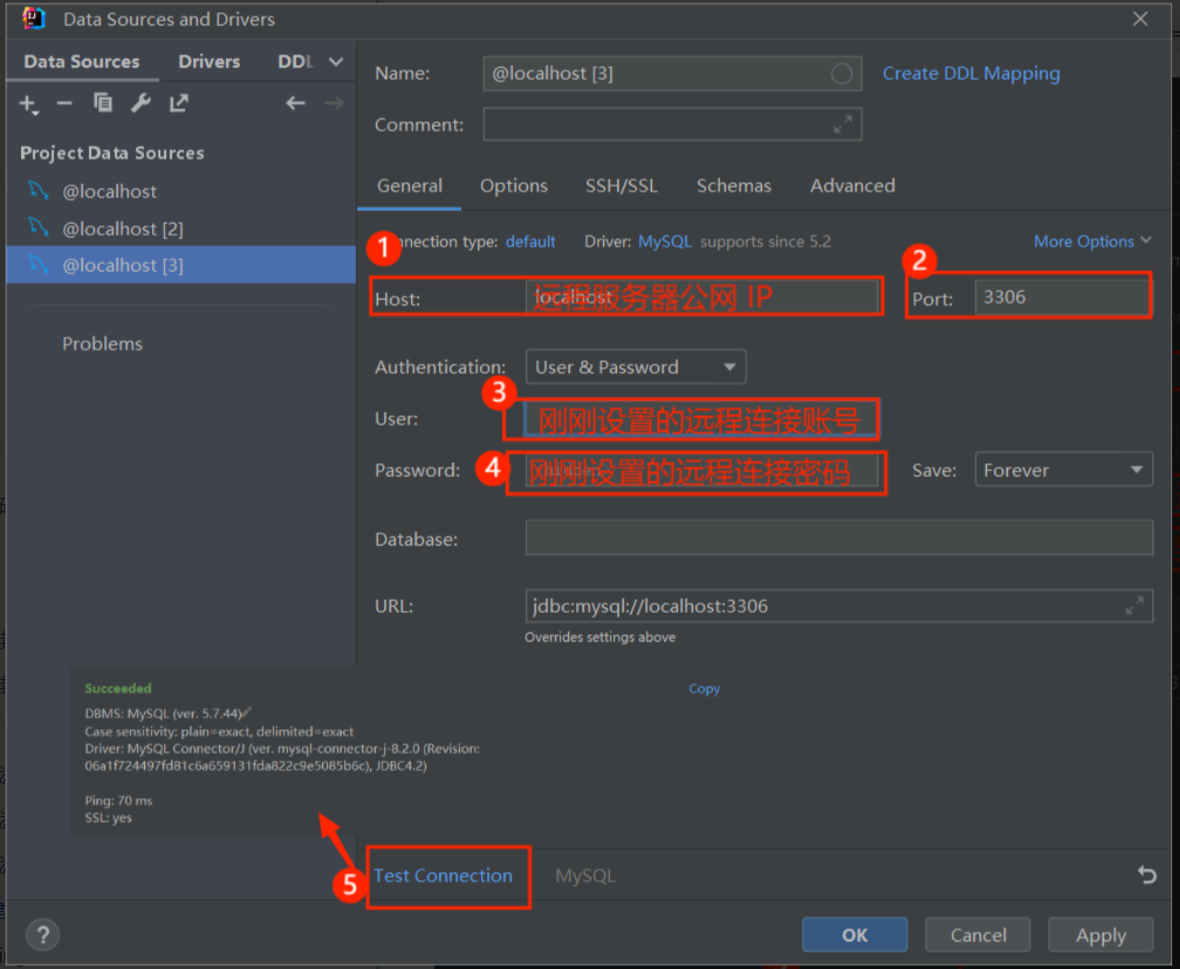
线上数据库搭建 Idea 测试连接
线上数据库连接成功后配置
原始 Nginx + SpringBoot 参考文章:https://www.bilibili.com/read/cv16179200 -by 鱼皮
前端 阿里云在线可视化工具:https://ecs-workbench.aliyun.com/
安装 nginx 服务器
依次执行下列命令
1
2
3
4
5
6
7
8
9
10
11
12
# 查看当前所在目录 pwd /root # 创建 services 目录,存放项目的依赖和安装包 mkdir services # 进入 services 目录 cd services # 列出当前目录所含文件 ls
1
2
3
4
5
6
7
8
9
10
11
12
13
14
15
16
17
# nginx 1.26.2 安装链接 https://nginx.org/download/nginx-1.26.2.tar.gz # 安装 nginx 命令 curl -o nginx-1.26.2.tar.gz https://nginx.org/download/nginx-1.26.2.tar.gz ls # 解压 nginx 安装包 tar -zxvf nginx-1.26.2.tar.gz # 进入 nginx 目录 cd nginx-1.26.2 ls # 删除 nginx 安装包——附加不执行 rm -rf nginx-1.26.2 rm -rf nginx-1.26.2.tar.gz nginx-1.26.2.tar.gz
1
2
3
4
5
6
7
8
9
10
11
12
# 检查 nginx 依赖环境是否正常 ./configure # 安装依赖 yum install pcre pcre-devel -y yum install openssl openssl-devel -y # 设置系统配置参数 ./configure --with-http_ssl_module --with-http_v2_module --with-stream # 再次检查 nginx 依赖环境是否正常 ./configure
1
2
3
4
5
6
7
8
9
# 开始编译 make # 安装 make install ls ls /usr/local/nginx/sbin/nginx # history 命令可以得到所有执行过的命令
1
2
3
4
5
6
7
8
9
10
11
12
13
14
# 配置环境变量 vim /etc/profile # shift + g 跳至最后一行 按 o,最后一行插入export PATH=$PATH:/usr/local/nginx/sbin # 按下 esc ,输入 :wq 回车,保存并退出 # 使文件生效 source /etc/profile # 执行 nginx # 查看启动情况,可以看到 80 端口已被 nginx 占用 netstat -ntlp
1
2
3
4
5
6
7
8
9
10
11
12
13
14
15
# 进入 conf 文件 cd conf ls # 复制 nginx.conf 文件为 nginx.default.conf cp nginx.conf nginx.default.conf ls # 查看原始配置文件 cat nginx.conf # 回到 services 目录 cd .. cd .. # 或者 cd /root/services
build 前端项目,将 dist 文件夹直接拖过来,失败了
1
2
3
4
5
6
7
8
9
10
11
12
13
14
15
16
17
# 查看 nignx 进程启动人 ps -ef | grep nginx # 修改 nginx 启动人为 root vim nginx.conf # 按 i 进入编辑模式,修改如下,修改完成按 esc ,输入 :wq ,回车 user root; worker_processes 1; #error_log logs/error.log; #error_log logs/error.log notice; #error_log logs/error.log info; #pid logs/nginx.pid; # 更新配置 nginx -s reload

 微信
微信 支付宝
支付宝